
How to Set Up a Google Ads Search Campaign for Lead Generation (2026 Guide)
By Muhammad Tayyab, Top Rated Google Ads Expert · Updated November 2026
Quick answer: to set up a Google Ads Search campaign for lead generation, start with conversion tracking, then build tightly themed ad groups around high-intent keywords, write responsive search ads with strong offers, add assets like calls and sitelinks, set precise locations and negatives, and begin with Maximize Conversions before moving to a target CPA. Below is the exact Google Ads Search campaign setup I use for service businesses.
Search is still where most lead-gen businesses should start. Someone typing “emergency roofer near me” or “rehab center for alcohol” wants help now. Your job is to show up for those searches, and only those. In other words, the setup decisions below matter more than any clever trick later.
Step 1: Set up conversion tracking first
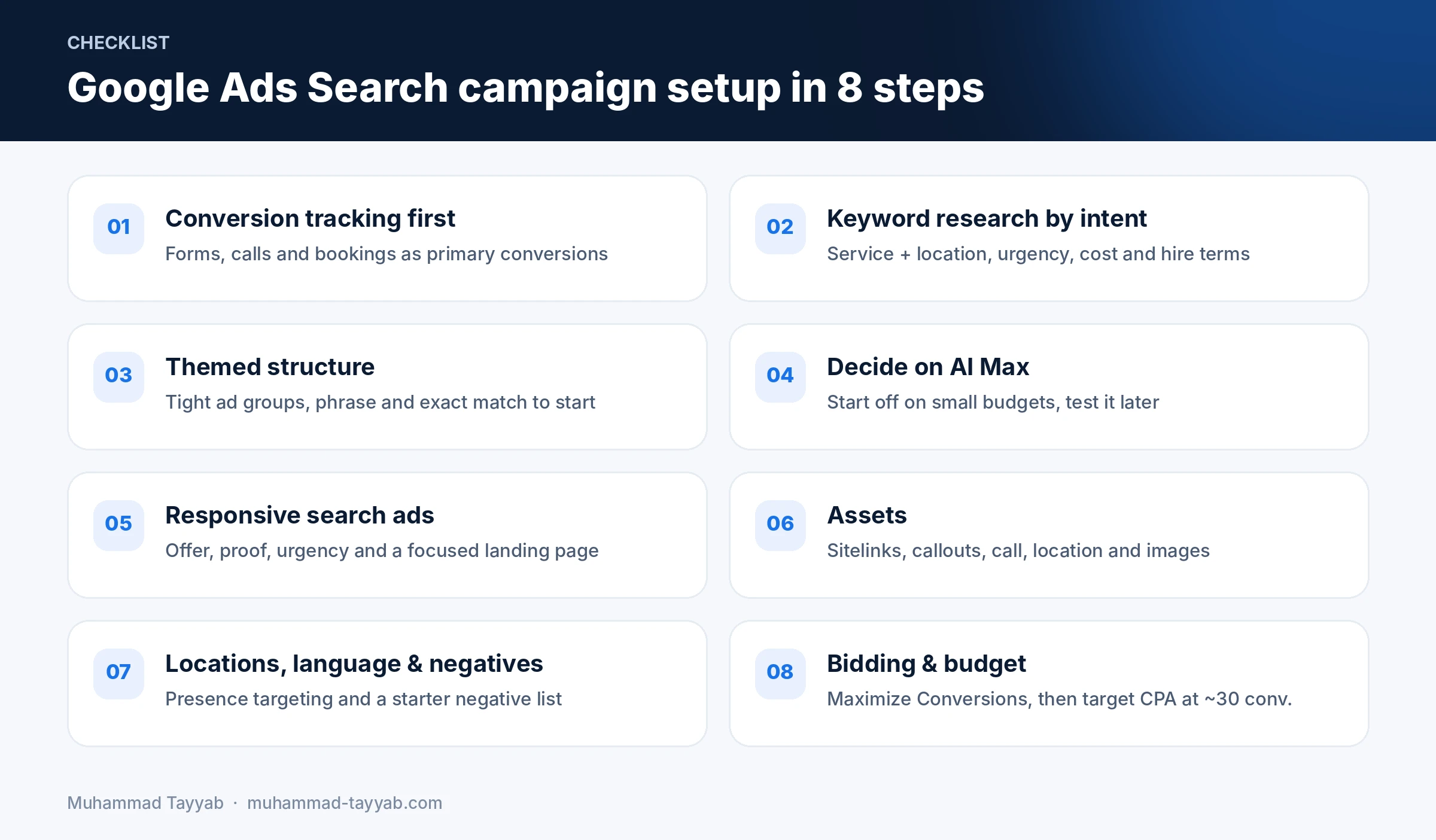
Never launch without it. Track form submissions, calls from ads, calls from the website and booked appointments as primary conversions. If you skip this, Smart Bidding has nothing to learn from. My Google Ads conversion tracking checklist walks through the full setup.
Step 2: Do keyword research around buying intent
Use Google Keyword Planner, your own search terms data (if you’ve run ads before) and your sales team’s language. Focus on keywords with clear intent:
- Service + location: “roof repair Denver”, “family lawyer Dallas”
- Urgency: “emergency”, “same day”, “24 hour”
- Cost and hire terms: “cost”, “price”, “quote”, “hire”, “company”
Meanwhile, skip informational terms like “how to fix a roof yourself”. They are cheap clicks, but they rarely become leads.
Step 3: Build a simple, themed structure
For most small and mid-size businesses, one Search campaign per service area or core service is enough. Inside it, create ad groups of 5 to 20 closely related keywords, for example “roof repair”, “roof replacement” and “emergency roofer”. Use phrase and exact match to start. Broad match can work well later, but only once conversion tracking is reliable and Smart Bidding has data.
Step 4: Decide on AI Max for Search
New Search campaigns now offer AI Max, which adds broader matching, AI-written ad text and automatic landing pages. For a brand-new lead-gen campaign with a modest budget, I usually start with AI Max off, get clean data for 4 to 6 weeks, then test it as an experiment. Here’s my full guide on AI Max for Search and what to check.
Step 5: Write responsive search ads that sell
- Use up to 15 headlines and 4 descriptions per ad, and put the main keyword in at least two headlines.
- Include your offer, proof and urgency: “Free Inspection”, “4.9★ from 300+ Reviews”, “Same-Day Service”.
- Pin only when you really need to, such as a legal disclaimer, because heavy pinning limits Google’s testing.
- Send traffic to a dedicated landing page with one clear call to action and a short form, not the homepage.
Step 6: Add assets
Assets make your ad bigger and more useful. At minimum, add sitelinks, callouts, structured snippets, a call asset (with call reporting on), a location asset if you have an office, and images. Note that Google has deprecated call-only ads, so a responsive search ad with a call asset is now the way to get phone leads from Search.
Step 7: Get locations, schedule and negatives right
- Locations: target only your real service area, and under location options choose “Presence: people in or regularly in your targeted locations”. The default “presence or interest” can waste a lot of budget for local businesses.
- Language: since September 2026, Google removed the language setting from Search campaigns and now uses your ad language and the searcher’s signals. So keep each campaign’s ads and landing pages in one language.
- Ad schedule: if you take calls, run call-heavy ads only when someone can answer.
- Negatives: add a starter list such as jobs, salary, free, DIY, course, training and used, then grow it weekly from the search terms report.
Step 8: Choose bidding and budget
For a new campaign, I usually start with Maximize Conversions and a budget that can buy at least 10 to 15 clicks a day. Once the campaign has roughly 30 or more conversions in 30 days, I add a target CPA close to the actual cost per lead. Also, Google has confirmed that normal budget and target changes on established campaigns don’t restart the learning period, so you can adjust carefully without fear.
What results can you expect?
It depends on your market, offer and budget, so nobody can promise numbers. For context, here are real accounts from my case studies: Kemah Palms, a rehab center, went from around $80 to $17.81 per lead with Search and Video campaigns, Premium Custom Boxes cut cost per lead from about $100 to $19.61, and Jansen Roofing, a home services business, reached €13.76 per lead with Search ads.
For a full list of Google’s setup options, see Google’s guide to creating a Search campaign.
Need hands-on help? I offer Google Ads lead generation for service businesses and conversion tracking setup with GA4 and GTM, for businesses in the US, UK, Canada and Australia. See all services →
Frequently asked questions
How much budget do I need to start a Google Ads Search campaign?
Enough to get meaningful data. As a rule of thumb, aim for at least 10 to 15 clicks a day at your expected cost per click, then judge the campaign after 3 to 4 weeks.
Should I use Performance Max for lead generation instead?
Usually Search first. Performance Max can work for leads, but it needs strong conversion tracking and ideally offline lead-quality data, otherwise it can bring in a lot of low-quality form fills.
How long does it take to see results?
You’ll see leads in the first days, but plan on 4 to 8 weeks of optimization before judging true cost per lead.
Want me to build your Search campaign?
I’m Muhammad Tayyab, a Top Rated Google Ads expert with 8+ years of experience building lead-generation campaigns for home services, healthcare, legal and B2B businesses across the USA. Read client reviews or claim a free Google Ads audit and I’ll show you what I would change first.